SER65078 - Micromodule 1 output + 1 power output (On/Off)
Product Description
The 16A power micro-module is a recessed, mains-powered module for controlling a load up to 16A (lighting, socket / cable outlet, ventilation, chime, shutter depending on configuration). Integrated into the Bluetooth Mesh ecosystem, it is configured via the mobile App for different use cases (On/Off control, dimming depending on load type, heating equipment control, etc.) and integrates with scenarios and voice assistant compatibility.
It also includes the range’s cross-cutting functions: status LEDs, Reset button, energy consumption metering, safety alerts (overheat, power outage, zero load) and software updates via the app.
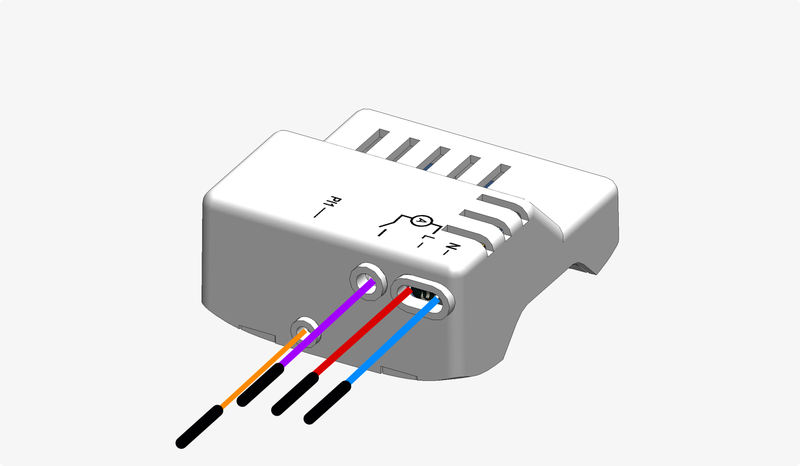
Item code : SER65078
Internal ref. : REF13
Technical Specifications
Power supply: 230V AC ~50Hz
Connectivity: Bluetooth Mesh
Dimensions: To be completed
Output: 100-230V AC 16A
Operating temperature: 10°C - 60°C
Mounting: Fits inside a recessed box
Maximum load limits
Load type |
Wiring |
Min power |
Max power |
Max current |
Per output |
|---|---|---|---|---|---|
Resistive (cos φ = 1) |
3500W |
16A |
|||
Other (motors, LED…) |
1000W |
4.3A |
Supported Functions
Control
 Heating management : Heating appliance management · Heating appliance management · Heating appliance management · Heating appliance management
 Lighting and socket management : Dimmer push-button · Motion detection · On/Off “light” output · On/Off “socket” output · On/Off switch
Automation
Scenario management · Vigilant Home
Energy & Sensors
Energy consumption measurement · Electrical flexibility management · Off-peak control
Security
Overheat alert · Power outage alert · Zero-load detection
Standard range functions
Product interfaces · Power supplies · Product health indication · User account · Software updates · Bluetooth Mesh connectivity functions · Voice assistant compatibility
Electrical Installation
Interfaces
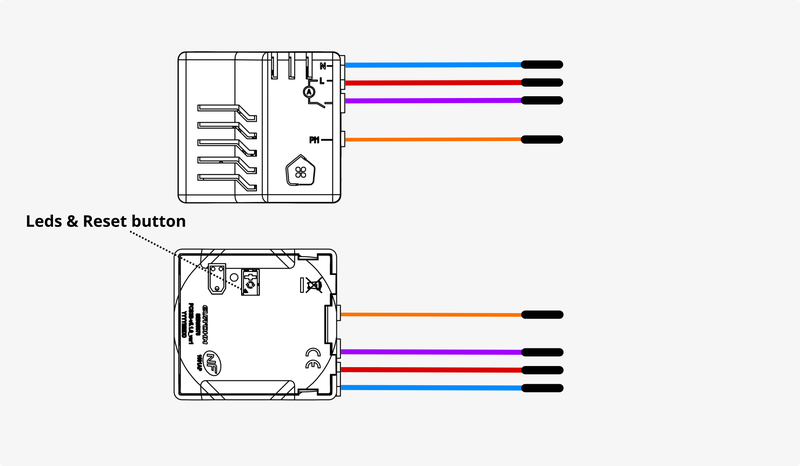
Mains connection
Warning
!! ELECTROCUTION HAZARD !! Before wiring this product, carefully read this warning: Electrocution Hazard
Input wiring 1-button/rocker switch
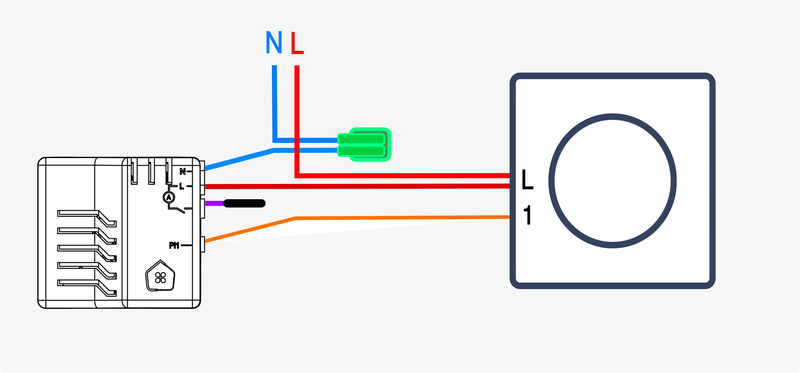
If the selected switch is a two-way switch, you can choose an assignment for the input from the following list:
If the switch is a push button, you can choose an assignment for the input from the following list:

Input wiring Motion detector
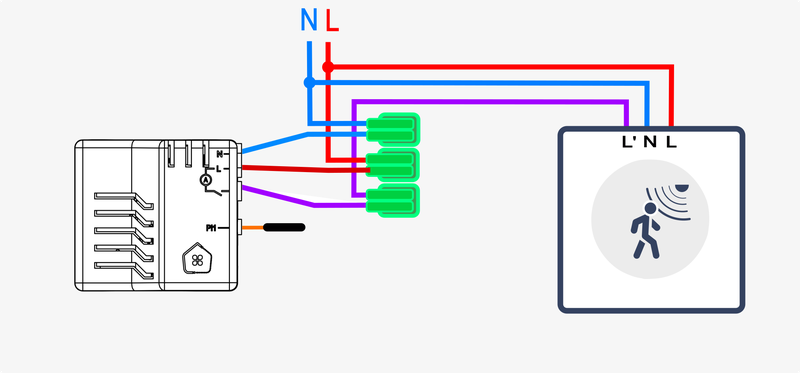
Automatic input assignment :
Output wiring On/Off (light bulb)
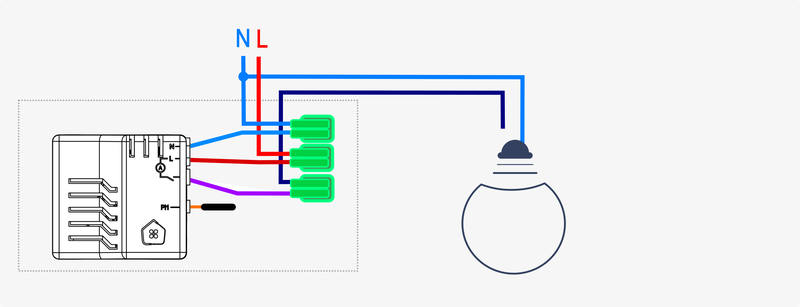
Output assignment :
Output wiring On/Off (plug)
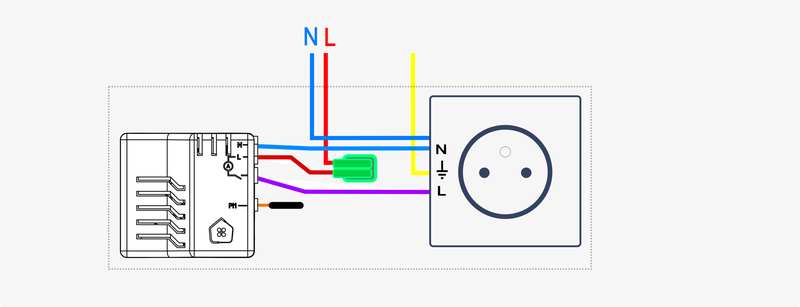
Output assignment :
Output wiring Cable outlet

Output assignment :
Output wiring Boiler

Output assignment :
Output wiring Zone valve

Output assignment :
Output wiring Heat pump

Output assignment :
Functional Setup
Once the product is electrically installed, you can power it on.
You can then start the functional setup from the mobile App.
Revision date : Oct 13, 2026